
| 일 | 월 | 화 | 수 | 목 | 금 | 토 |
|---|---|---|---|---|---|---|
| 1 | 2 | |||||
| 3 | 4 | 5 | 6 | 7 | 8 | 9 |
| 10 | 11 | 12 | 13 | 14 | 15 | 16 |
| 17 | 18 | 19 | 20 | 21 | 22 | 23 |
| 24 | 25 | 26 | 27 | 28 | 29 | 30 |
| 31 |
- 등차수열
- Linux
- baekjoon
- 마리아 DB
- LeetCode
- 그랑사가
- 환경설정
- C언어
- 데이터 베이스
- 우분투
- 토픽
- 기초
- 정글리아
- while
- JungOl
- 오늘도 우라라
- 반복문
- Subscribe
- topic
- mariaDB
- publish
- 프로그래밍
- 오늘도 우라라 공략
- C++
- ros2
- 오늘도 우라라 펫 공략
- ros
- 오늘도 우라라 펫
- MSG
- 리눅스
- Today
- Total
하루의 쉼터
[ROS2] Behavior Tree 기초 개념 이해 본문
Out Line :
Behavior Tree 기초 개념 이해
What ?
Behavior Tree - 작업 실행 흐름을 제어하는 계층적 노드 트리
Why ?
복잡한 "행동 선택"이나 "결정 흐름"이 필요한 모든 상황에 대한 행동 및 판단을 하기 위해
Where?
- 응용 분야 : Robot , Game, 자율 주행, 시뮬레이션,AI 등
- https://github.com/BehaviorTree/BehaviorTree.ROS2
GitHub - BehaviorTree/BehaviorTree.ROS2: BehaviorTree.CPP utilities to work with ROS2
BehaviorTree.CPP utilities to work with ROS2. Contribute to BehaviorTree/BehaviorTree.ROS2 development by creating an account on GitHub.
github.com
FSM 과는 무엇이 다른가?
* FSM : 상태 기반의 동작 제어( 단방향제어 전달 )로 단순 작업에는 유용하지만 규모가 커지고 복작한 작업에는 다소 문제가 존재 (전이 조건 중복, 상태 제어 수 많아짐, 확장의 어려움 )
Behavior Tree 는 계층적 흐름과 중첩 제어, 노드 삽입 등을 통하여 이러한 문제점을 다소 해결할 수 있다.
Tick - Root Node 에서 Leaf Node 까지 트리를 통해 전달하는 신호 (스케줄러의 호출 신호)
- Tick 신호를 수신한 Node는 콜백을 실행하여야하며 다음 중 하나를 반환해야함.
- Success : 성공
- FAILURE : 실패
- RUNNING : 진행
- Type of Tree Node
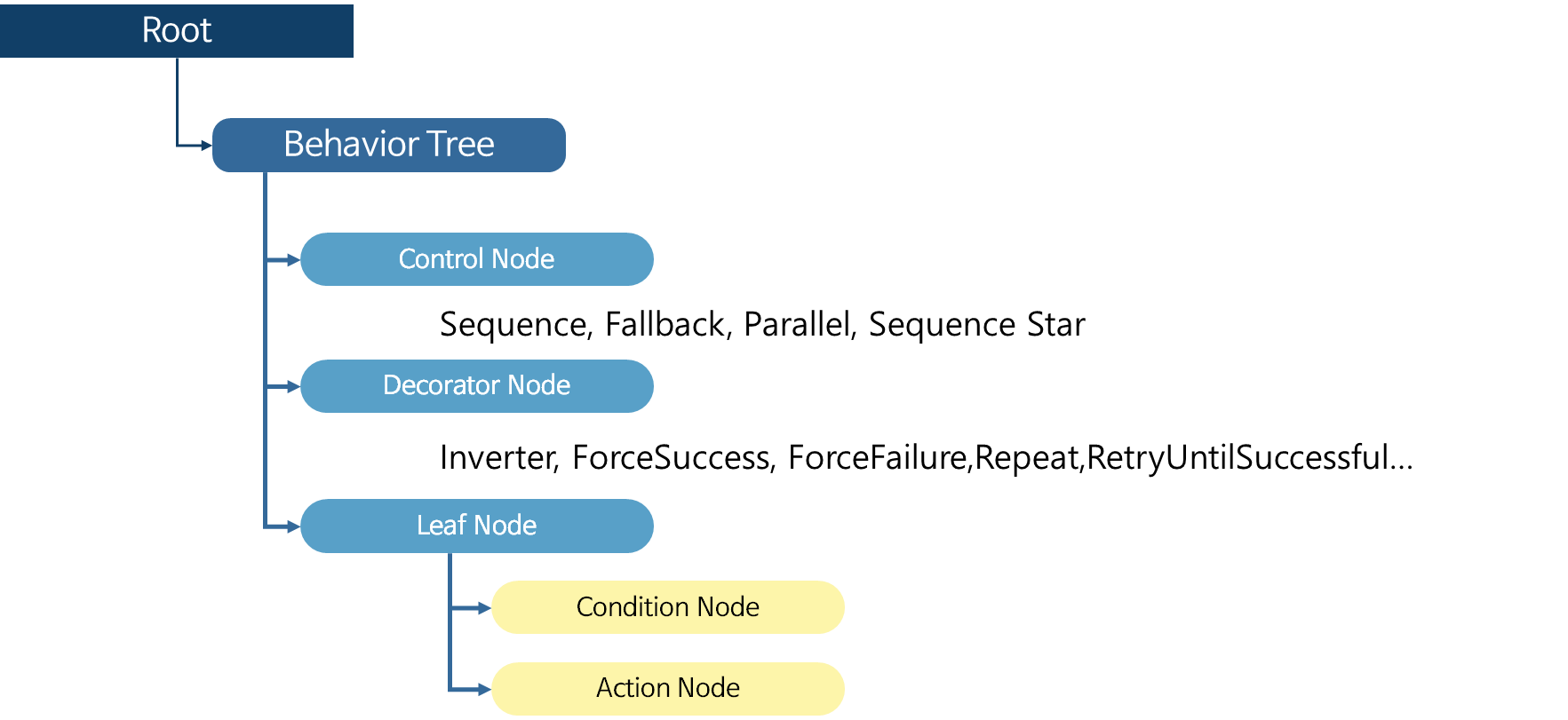
- Control Node
- Decorator Node
- Leaf Node
- Condition Node
- Action Node
- Control Node - 하나 이상의 Child Node를 가지며 tick을 전달하고 실행 순서와 조건을 제어하는 노드
- Sequence , Fallback, Parallel, Sequence Star
- Decorator Node - 하나의 자식 노드를 가지며, tick 전달 방식 또는 자식의 결과 상태를 변경 하거나, 조건 또는 반복/지연 등의 부가 기능을 수행하는 Node
- Inverter,ForceSuccess, ForceFailure, Repeat,RetryUntilSuccessful,KeepRunningUntilFailure,Delay,RunOnce
- Leaf Node - 실제 동작 또는 조건 체크가 되는 Node
- Condition Node - 현재 상태를 판단 및 체크 하는 Leaf Node 반환 시 RUNNING 상태는 불가
- Action Node - 동작 실행 Leaf Node
Sequence(Control Node) - Child Node를 차례로 실행하고 모두 성공하면 SUCCESS를 반환 , 순차적으로 자식이 SUCCESS를 반환하는 동안은 RUNNING 상태
Fallback(Control Node) - Child Node 를 순서대로 실행 시키며 실패하면 다음 Child Node로 Tick , 성공 하면 SUCCESS를 반환 하고 즉시 종료, 모든 Child Node 가 FAILURE를 반환 하면 FAILURE 반환
Reference :
https://www.behaviortree.dev/docs/intro
'프로그래밍 > ROS2' 카테고리의 다른 글
| [INSTALL] Windows11 WSL + ROS2 install (0) | 2025.08.12 |
|---|---|
| [BehaviorTree] XML 기초 설명 (0) | 2025.07.18 |
| [ROS Simulator] Gazebo Path (0) | 2025.01.22 |
| XSense Ros2 Launch for humble (0) | 2024.11.13 |
| [IDE] 개발 환경 서포트 By VSco (0) | 2023.12.02 |

